AI Search Visibility Tracking: A 4-Layer Guide and Monthly Scorecard
Leadership wants to know what AI search is worth. Report four numbers side by side, from Search Console, GA4, a bilingual prompt panel and your CRM, and never add them up.
Meowket's take Stop hunting for a single AI visibility score. Four honest numbers with their blind spots beside them will earn more trust with leadership than one inflated metric.
To track AI search visibility for a Hong Kong B2B brand, report four numbers side by side and never add them together: Google Search Console’s AI impressions, GA4’s AI Assistant sessions, the mention and citation rates from a fixed bilingual prompt panel, and qualified pipeline in your CRM. Each answers a different question, and none proves that AI caused a deal. Below is a completed one-page scorecard first, then how to build each layer as the tools work in November 2026.
Key Takeaways
- Search Console’s Generative AI performance report, live for all sites since 31 August 2026, counts impressions in AI Overviews and AI Mode. It shows no clicks, leads or other AI tools.
- Google Analytics Help says GA4’s AI Assistant channel covers sources such as ChatGPT, Gemini, DeepSeek, Copilot and Grok, and excludes Google’s AI Overviews and AI Mode, which count as Organic Search.
- A prompt panel gives a directional sample, not market share. CRM pipeline “associated with AI sources” is the closest you’ll get to business impact, and it still isn’t proof of cause.
Google Search Console and Google Analytics Help last checked: 11 November 2026.
The one-page monthly scorecard (completed example)
Start with the end product. Leadership should see four rows, each with its source, its number against a baseline and its blind spot. Putting the limit next to the number stops anyone reading impressions as leads.
Sample data, not real client results. A Hong Kong B2B logistics software vendor sells to regional supply chain directors. It tracks 10 product and pricing pages and runs 20 prompts, each in English and Traditional Chinese, on two AI tools each month (80 logged answers).
| Layer | Metric | This month (baseline) | What it cannot prove |
|---|---|---|---|
| Google Search Console | AI Overviews and AI Mode impressions, Hong Kong, 10 tracked pages | 4,200 (3,100) | Leads, revenue, or visibility on other AI tools |
| GA4 | AI Assistant sessions, plus demo requests from them | 350 sessions, 11 demo requests (290, 8) | All visits from every AI surface; some arrive as Direct or Organic Search |
| Prompt panel | Share of 80 logged answers that name the brand / cite a brand URL | 30% named, 15% cited (25%, 10%) | Overall market share or what each real buyer saw |
| CRM | Qualified pipeline whose first-touch or self-reported source was an AI tool | HK$450,000 from 3 opportunities (HK$280,000 from 2) | That AI visibility alone caused the deals |

The report calls the CRM figure “pipeline associated with AI sources”, not “pipeline generated by AI”. The next sections show how to fill each row.
Four metrics, four different things
The four numbers count different events, so adding them up gives a meaningless total. An impression is an appearance in a Google answer. A session is a visit. A panel result is your own test. A pipeline figure is money attached to a lead record. They may not involve the same people or the same journeys.
Similar names cause confusion too, so agree these terms with your team:
| Term | What it is | Where it shows up |
|---|---|---|
| AI Overviews | A generative AI summary in Google Search results | Search Console Generative AI report; clicks count as Organic Search in GA4 |
| AI Mode | A separate generative AI search experience from Google | Same as AI Overviews |
| GA4 AI Assistant channel | Visits from AI assistants such as ChatGPT, Gemini, DeepSeek, Copilot or Grok | GA4 default channel group only |
| Ads in AI Overviews | A Google Ads product with its own country list | Not in the organic reports above; see our AI Overviews ads guide |
Google AI Overviews and AI Mode are both officially available in Hong Kong. For the full, dated availability table, including Gemini, Copilot and ChatGPT, see our guide to generative engine optimisation.
A four-layer framework for AI search visibility tracking
Each layer has one owner and one output. Search Console covers Google’s AI features, GA4 covers identifiable AI-referred visits, the prompt panel covers answers that send no click, and the CRM covers pipeline.

Four-Layer B2B AI Search Tracking Framework
- Search Console: the SEO lead exports Generative AI impressions monthly by page and country, and files the export with a short trend note.
- GA4: the analytics owner reports AI Assistant sessions, landing pages and key events in a saved report.
- Prompt panel: a content or SEO owner, with a native Traditional Chinese reviewer, runs fixed prompts on a set schedule and keeps a citation log.
- CRM: marketing and sales operations capture source and landing-page fields on every lead, and produce a monthly view split into sourced and influenced pipeline.
Layer 1: Read Search Console’s Generative AI performance report
According to Search Console Help, impressions in this report are how many times links to your site were shown to a user in a generative AI feature on Google Search, currently AI Overviews and AI Mode. Google introduced the report on 3 June 2026 for a subset of sites and rolled it out to all websites worldwide by 31 August 2026. Search Labs experiments are excluded.
Setup, as the interface worked in November 2026:
- Open the Generative AI performance report for your property.
- Filter Countries to Hong Kong, and keep a second export for other markets you sell into.
- Group by Pages to see which URLs Google’s AI features linked to. Add the 10 pages you track as a URL filter if you want a chart for those pages only.
- Set the date range to the calendar month and export the table.
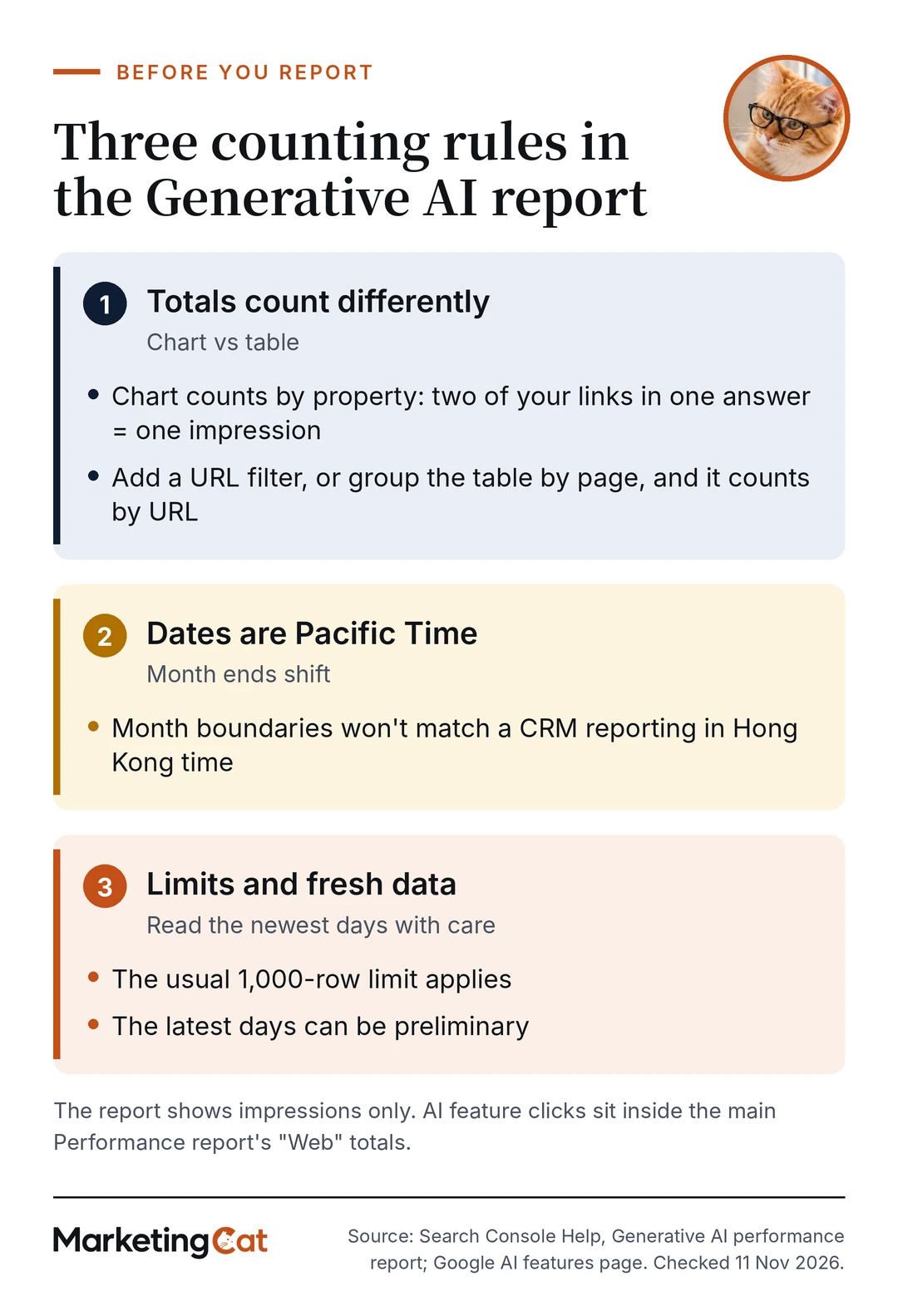
Three counting rules matter for monthly reporting:
- The chart counts by property, so two of your links in one answer count as one impression. Add a URL filter and it counts by URL. A table grouped by page counts by page, so chart and table totals can differ.
- Dates are in Pacific Time, so month boundaries won’t match a CRM that reports in Hong Kong time.
- The usual 1,000-row limit applies, and the newest days can be preliminary.
If the report is missing, your site may have too few impressions in these features, or it may be excluded from them in Search Console. The report shows no clicks or queries. Google’s AI features page says AI feature traffic is reported within the “Web” search type of the main Performance report, mixed in with ordinary results.
Layer 2: Capture the AI referral floor in GA4
Google Analytics Help defines the AI Assistant channel as visits from sources like ChatGPT, Gemini, DeepSeek, Copilot or Grok. A session joins it when the medium is exactly “ai-assistant”, or when the referrer matches Google’s list of AI assistants. The same page says this channel excludes Google’s AI Overviews and AI Mode, which are counted under Organic Search.
To find it, open the Traffic acquisition report with Session default channel group as the primary dimension. Then switch to Session source / medium to see the raw labels, such as chatgpt.com or perplexity.ai. Record AI Assistant sessions, their top landing pages and the key events on those pages, such as demo requests. Google doesn’t publish its full list of AI assistants, so check in Session source / medium whether perplexity.ai and claude.ai land in AI Assistant or Referral.
Report this number as a floor, not a total. Hong Kong agency SDMC points out that some mobile apps strip the referrer, in-app browsers can lose source data, and business users often paste a recommended URL into a new tab. Those visits can land in Direct or other channels. SDMC also notes that the new channel doesn’t reclassify earlier traffic, so comparisons with last year need the custom channel group described at the end of this guide.
Layer 3: Run a bilingual prompt panel with a citation log
A prompt panel is a fixed set of buyer questions you ask AI tools on a schedule, logging whether your brand is named or cited. It covers answers that never send a click. Write each prompt in English and in Traditional Chinese, phrased the way your buyers would ask. For what to change when the log shows weak citations, see our guide on how to get cited in AI search.
Keep one row per answer, with the date, tool, language, prompt ID, sign-in status, location and device; whether the brand was named; any URL cited; competitors named; and reviewer notes on inaccurate claims. Use the same prompts, tools and settings every cycle, and run important prompts more than once.
Report two rates. Mention rate is the share of logged answers that name your brand. Citation rate is the share that cite one of your URLs. They’re a directional score from your own sample, not a representative market share or a true probability of being cited. Answers change between runs and between users.
Keep customer data out of prompts. If anyone uses CRM notes to write them, get internal approval and follow the PCPD’s Checklist on Guidelines for the Use of Generative AI by Employees: use permitted tools, limit and anonymise personal data, and keep a person reviewing outputs. For wider governance, see our enterprise AI adoption guide.
Layer 4: Tie AI traffic to CRM pipeline
Capture the first-touch source, medium and landing page on every form submission. Add a required “How did you hear about us?” field with options for “ChatGPT or another AI assistant” and “Google AI results”. Self-reported answers depend on memory, so report them separately from tracked sources.
Attribution has firm limits. A source field or tag helps estimate contribution; it doesn’t establish that AI caused a deal. B2B buying groups make single-touch credit weaker still: Forrester’s State of Business Buying 2026 release says a typical decision involves 13 internal stakeholders and nine external influencers. The person who asked ChatGPT may not be the one who fills in your form, so ask sales to note AI mentions in discovery calls.
Timing matters too. Ehrenberg-Bass Institute’s John Dawes suggested in May 2021, as a rule of thumb rather than a precise figure, that up to 95% of business clients aren’t in the market for many goods and services at any one time. A rise in visibility this month may not show up in pipeline for a while, so judge results over a period that matches your sales cycle.
Report two lines: pipeline sourced by AI channels and pipeline influenced by them. For the wider method, see our guide to measuring B2B SEO ROI; to choose a CRM that holds these fields, see our HubSpot vs Salesforce comparison.
How to decide what to do next
Make qualified pipeline associated with AI sources the primary KPI, and use your first complete month as the baseline. Costs are mostly staff time: analytics setup, CRM field changes and a few reviewer hours per cycle, plus an optional tool.
Read the four rows together. If impressions and citation rate rise for several months while the CRM shows nothing, fix lead capture before cutting content. If capture works and no pipeline appears over a full sales cycle, keep the free layers running and drop any paid tool.
Should you pay for an AI visibility tool?
Paid tools can automate the prompt panel, but their figures are vendor outputs, not market data. Confirm that a tool supports your exact bilingual prompts and session settings before you buy. MarketingCat has not tested these tools. Tool vendor Rankability’s comparison guide ranks its own product first and says so; it says its prices were checked in May 2026 and are directional.
| Tool | Starting price in Rankability’s guide (May 2026) | Rankability’s positioning (paraphrased) |
|---|---|---|
| Otterly AI | From US$29/mo | Budget AI search monitoring |
| ZipTie | From US$69/mo | AI Overviews, ChatGPT and Perplexity tracking |
| LLMrefs | From around US$79/mo | Affordable AI visibility tracking |
| Rankability | From US$97/mo | SEO and AI visibility workflows |
| AthenaHQ | From around US$295/mo | Mid-market GEO and AI search tracking |
| Profound | From US$499/mo historically; enterprise/custom | Enterprise AI search intelligence |
These aren’t current prices; confirm with each vendor. Our sources don’t compare the tools’ Traditional Chinese support, so test your own bilingual prompts during a trial.
Limitations and common mistakes
- Adding Search Console impressions to GA4 sessions. One counts appearances, the other counts visits.
- Looking for AI Overviews clicks in GA4’s AI Assistant channel. Google counts them as Organic Search.
- Presenting a prompt-panel rate as market share. It’s your own small sample.
- Quoting conversion multipliers for AI visitors from agency blogs that don’t show their sample or method.
- Reading the gap between chart and table totals in Search Console as an error.
Advanced: GA4 custom channel group settings
A custom channel group can collect AI sources that land in Referral. Google Analytics Help sets out the steps, includes its own AI assistants example, and says custom channel groups can be applied to reports retroactively:
- Confirm you have the Editor role or above.
- In Admin, under Data display, open Channel groups and create a new group.
- Add an AI channel with a Source condition set to “matches regex”. Google’s help page gives an example pattern; vendor Omnibound suggests a shorter one:
.*(chatgpt|openai|perplexity|gemini|copilot|claude|deepseek|grok).* - Place the AI channel above Referrals. Google says traffic goes into the first channel whose definition it matches.
Check what the rule catches, because short strings can match unrelated sources. Regrouping only organises source information GA4 kept; it can’t recover sources that were lost. If you tag links yourself, keep UTM values consistent and lowercase.
The four layers won’t give leadership one tidy AI number, and that’s their strength. A report that shows its blind spots earns more trust than a single inflated score. This week, open GA4’s Traffic acquisition report, note your AI Assistant sessions, and add “AI assistant” as an option in your demo form’s source field. That gives you two baseline rows before you spend anything on tools.
Frequently Asked Questions
AI Overviews impressions are up but organic clicks are down. Is performance getting worse?
Not necessarily. The Generative AI report shows impressions only, and AI feature clicks are folded into the main Performance report’s Web totals. Compare key events on the relevant landing pages in GA4, and CRM pipeline, before drawing conclusions.
Can we stop our site appearing in Google’s AI features?
Yes. Google’s June 2026 announcement introduced a Search Console control for this. Google says sites that opt out won’t receive traffic or impressions from those features, and the Generative AI report may then be unavailable. Weigh the lost visibility before deciding.
Can Search Console separate branded from non-branded searches?
Yes, for eligible sites. Google introduced a branded queries filter in the Performance report on 20 November 2025 and said in March 2026 that it is available to all eligible sites. It works only for top-level properties with enough volume, and some queries may be misidentified. A rising branded trend is a signal to investigate, not proof of AI influence.
Can we report a vendor’s “AI visibility share” to leadership?
Only with a label and a method note. Check each tool’s prompts, sample size, locations and calculation first, mark the figure as vendor data, and show it next to GA4 visits and CRM pipeline so leadership can see whether visibility and business results move together.