Copilot Autopilot and Workspaces: Rollout and Billing
Copilot Autopilot and Workspaces are reaching Microsoft 365 customers through the Frontier early-access programme. Here’s what each does, what Copilot costs in Hong Kong, how usage billing works and four checks before an agent touches client data.
Meowket's take Autonomous follow-ups sound tempting, but start your pilot in a bounded Workspace instead. Let your team master curated file grounding and human sign-offs before turning an unprompted agent loose on client inboxes.
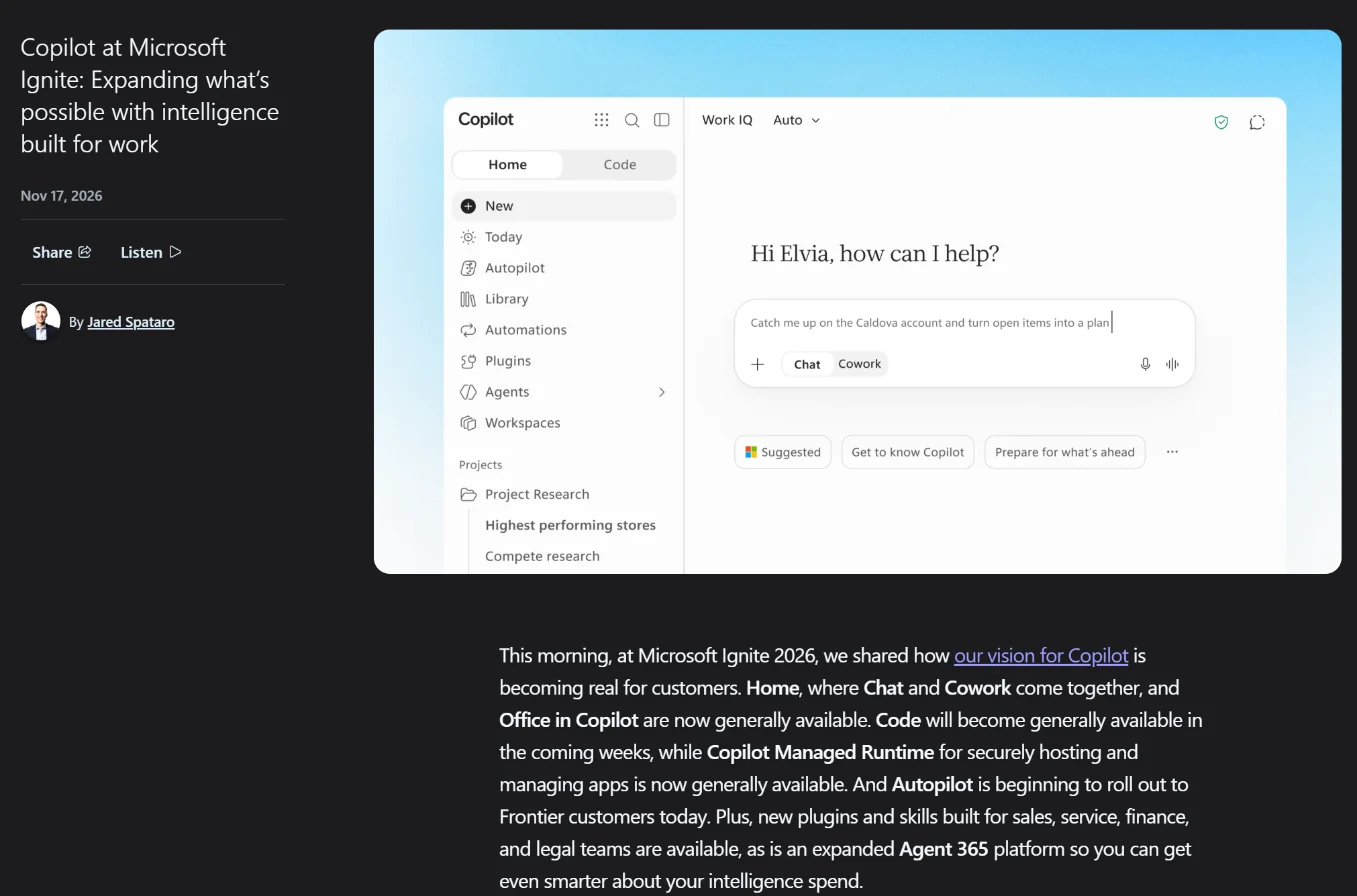
Microsoft used Ignite 2026 to make Copilot’s Home experience generally available, to start rolling out its Autopilot agent to Frontier customers and to open Workspaces in Frontier, according to Microsoft’s Ignite announcement of 17 November 2026. Workspaces is the renamed Copilot Notebooks. For Hong Kong companies on Microsoft 365, Copilot itself is available locally. Autopilot and Workspaces, the two pieces marketing and sales teams will ask about first, are still reaching customers through Microsoft’s Frontier early-access programme, and Autopilot is billed by usage on top of a Copilot licence. This article sets out what each piece does and what it costs in Hong Kong, then gives a four-gate checklist for deciding when an agent may touch client data.
Key Takeaways
- Copilot is available in Hong Kong: Microsoft lists it in over 170 markets, and its exceptions cover mainland China and embargoed markets. It gives no Hong Kong date for Autopilot or Workspaces, which reach tenants through the Frontier preview programme.
- Microsoft’s Hong Kong price list starts Copilot at US$21 per user a month for the Copilot Business add-on, or US$30 for Microsoft 365 Copilot. Cowork and Autopilot are billed by usage on top, and Microsoft hasn’t published that rate.
- Autopilot acts without waiting for a prompt, and deleting a Workspace is currently permanent. Set scope, data rules and human approval points before any pilot touches client data.
Last checked against Microsoft’s help pages: 20 November 2026.
Can you use Copilot Autopilot and Workspaces in Hong Kong?
Copilot is available in Hong Kong, but Microsoft hasn’t stated a Hong Kong status for Autopilot or Workspaces specifically. Microsoft’s supported languages page (last updated September 2026) says Copilot is available in over 170 markets. Its exceptions cover “China (excluding Hong Kong SAR)” and embargoed markets.
The same page warns that a newly released feature “may not be immediately available in all regions or languages.” For Autopilot and Workspaces, access depends on Microsoft’s Frontier programme and on your tenant’s rollout schedule. According to Microsoft’s Frontier admin guide, Frontier gives organisations preview access to Microsoft 365 features before general availability. An admin with the AI Administrator, Security Administrator or Office Apps Administrator role switches it on in the Microsoft 365 admin center, for all users or for chosen groups. The guide lists no regional restrictions.
Enrolment alone isn’t enough for Autopilot, though. Microsoft’s Autopilot overview says it also needs a preview assignment, and Microsoft’s Tech Community launch post lists three conditions: a Copilot licence, usage-based billing switched on, and the required management and security capabilities. For Workspaces, Microsoft’s help page tells admins to check Microsoft 365 Message center for their organisation’s rollout details.
What launched at Ignite, and what each piece can’t do yet
Only Home is generally available among the four pieces, and Microsoft says it is still rolling out worldwide. Autopilot and Workspaces are in Frontier. Code is in Frontier too, and Microsoft’s Ignite Book of News says it will be generally available in December. Two of them aren’t new: Autopilot was previously called Scout, and Workspaces is the renamed Copilot Notebooks. The statuses below come from Microsoft’s Ignite announcement and Book of News, and each product name links to its help page.
| Product | What it does | Status (November 2026) | Main documented limits |
|---|---|---|---|
| Autopilot | Always-on personal agent that appears in Teams, Outlook, chats, channels and documents, where you can @mention it like a colleague | Preview; rolling out to Frontier customers | One per person; own Entra Agent ID and named manager; IT can scope or block it |
| Workspaces | Shared space where a team and Copilot work on one workstream | Available in Frontier; phased rollout from late October 2026 | Grounds on up to 300 files; can’t generate images, charts or graphs directly within the workspace; deletion is permanent for now |
| Home | Starting point combining Chat and Cowork, with Auto model routing | Generally available, still rolling out; Today is in private preview through Frontier | Cowork and Code access depend on licence and organisation settings |
| Code | Builds apps, interactive dashboards and desktop widgets from plain-language descriptions | In Frontier; generally available in December, per the Book of News | Runs in a sandbox; usage-billed; apps are managed in the Microsoft 365 admin center |
Today is a command centre inside Home, covering mail, calendar, Teams threads, meetings and tasks. Microsoft says it shows what you missed, what needs attention now and what can wait. It is in private preview in the Copilot app and Outlook. According to the Book of News, its daily refresh is included with a Microsoft 365 Copilot licence, while recurring updates through the day use Copilot credits. The Book of News also says that, “coming soon”, teams will be able to bring their personal Autopilot into Workspaces. That combination isn’t available yet.
Which plans include them, and what will they cost?
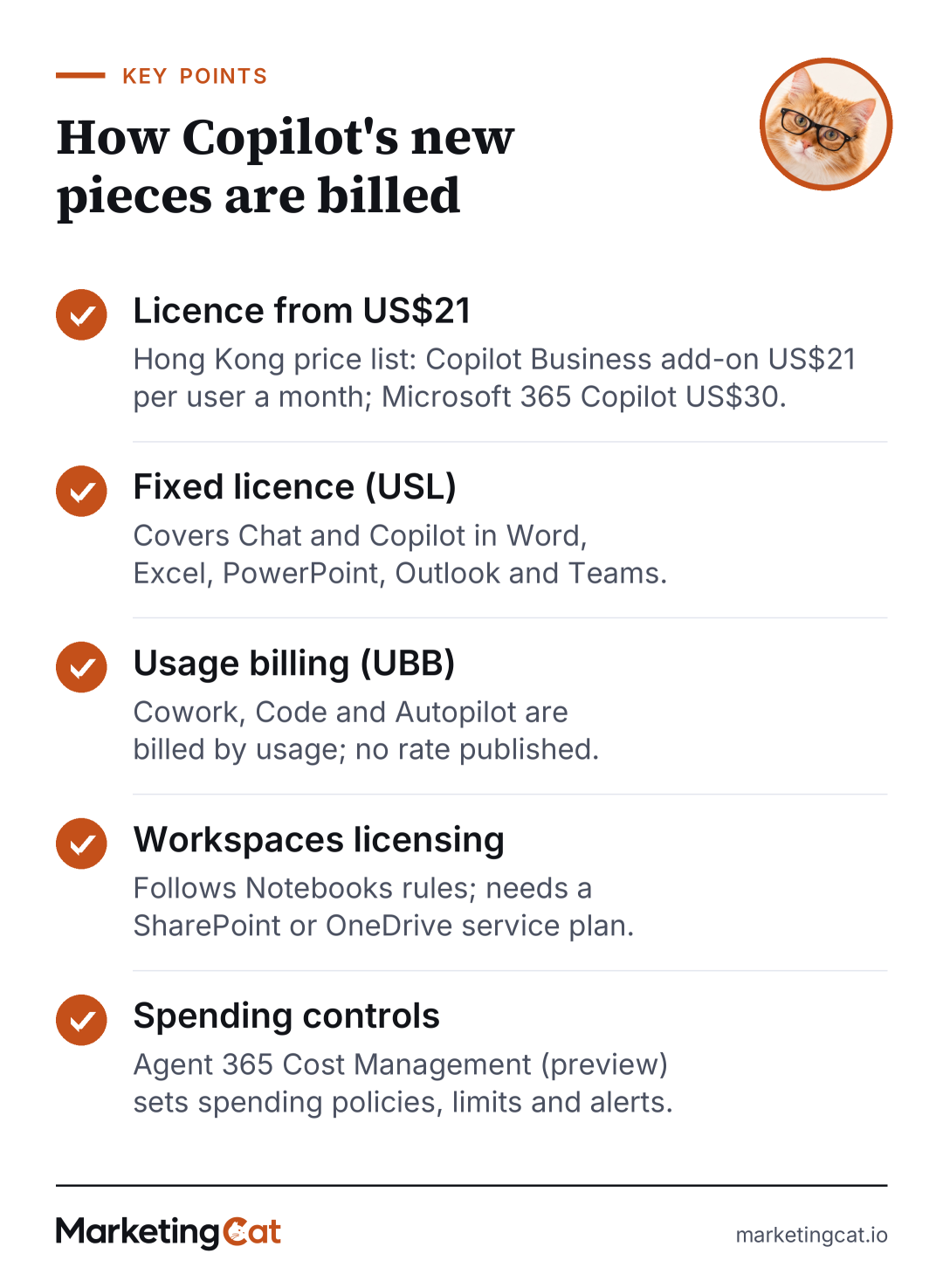
Microsoft publishes licence prices but no rate for Autopilot’s usage billing. Its Copilot pricing page for Hong Kong (in Chinese, checked 20 November 2026) lists prices in US dollars per user a month, billed annually. The Microsoft 365 Copilot Business add-on is US$21, or US$18 in the first year under a promotion for existing Microsoft 365 business customers that runs until 31 December 2026. Microsoft 365 Business Standard or Business Premium bundled with Copilot Business costs US$23.50 or US$32, for organisations of up to 300 users. The enterprise plan page lists Microsoft 365 Copilot at US$30. All three business plans mark Cowork and Autopilot as usage-based, and a footnote warns that usage charges can take the bill above the licence fee. Treat any usage rate you hear as a quote to confirm in writing.
The billing model behind those prices is as follows. In its September 2026 Asia announcement, Microsoft said the User Subscription License (USL) covers Chat and Copilot in Word, Excel, PowerPoint, Outlook and Teams. Cowork, Code and Autopilot use Usage-Based Billing (UBB). Microsoft added that it will keep adjusting Copilot pricing.
Workspaces follows the Notebooks licensing rules. According to Microsoft’s Notebooks help page (updated November 2026), Notebooks is available to Microsoft Copilot and Copilot Chat licensed users. It is also available to Microsoft 365 Personal, Family, Premium and Pro subscribers. Accounts need a SharePoint or OneDrive service plan to create one.
For budgeting, usage billing makes Autopilot a variable cost. At Ignite, Microsoft said Agent 365 Cost Management lets leaders set spending policies, limits and proactive alerts and control which models are available, and the Book of News lists those controls as in preview. In September, Microsoft also said staff would see their own AI credit use in Copilot and that requests for more credit could feed into existing approval workflows. Confirm with Microsoft which of these controls are live in your tenant, and agree a monthly ceiling with finance before a pilot, not after the first invoice. Our article on the cost of building AI agents covers the other cost lines to plan for.
Where marketing and sales teams could use them
The clearest fits are in work your team already repeats every quarter.
- Account planning in Workspaces. A shared workspace can hold the briefs, decks and meeting notes for a key account. Copilot then answers only from those references, which suits a sales and marketing pod working on the same renewal.
- Campaign follow-through with Autopilot. Microsoft says Autopilot can watch Teams channels, follow up on threads and run recurring work. For a marketing team, that could mean chasing content approvals or compiling a weekly campaign status note.
- Proposal drafting from CRM context. At Ignite, Microsoft said its Dynamics 365 Sales plugin brings sales skills into Copilot, and the Book of News lists it as generally available. A new Salesforce in Copilot plugin with more than 38 prebuilt sales skills is in preview. Microsoft’s material doesn’t mention HubSpot.
Illustrative example, not real client results: a Hong Kong B2B financial software firm runs a six-week pilot with eight team members. They share one Workspace grounded on 50 approved files for 30 APAC enterprise accounts, and the team lead uses her Autopilot only for internal follow-ups, such as chasing content approvals. To make the pilot reliable, the team uses the same file set and prompt templates throughout and repeats important requests more than once. They keep a log of what was tried and check outputs against the real CRM record. The primary KPI is the hours spent preparing each account brief, recorded as a baseline before week one. They scale only if it improves without errors reaching clients.
Limits and risks when agents touch client data
The main risk is that Autopilot acts on its own. Microsoft says it can follow up on threads and run recurring work “without waiting for a prompt.” An agent that emails a client contact the wrong renewal terms creates a client problem, and possibly a privacy one. Microsoft’s controls are real but need configuring. Each Autopilot has its own Microsoft Entra Agent ID and a named manager. IT can scope its access and block it at any time. Its sign-ins and actions are logged under its own name. Microsoft also says you decide what work it takes on, and that it can check with you before key actions. Its overview page adds two limits worth knowing. Only your own requests authorise its actions, not instructions it finds in emails, files or web pages. And its activity view isn’t a guarantee of a complete administrative audit record.
Workspaces carries different risks. According to the Notebooks help page, Copilot uses only the references added to a notebook, not your whole mailbox or OneDrive. Microsoft says core Microsoft 365 security, compliance and governance controls continue to apply after the rename. However, deleting a Copilot page or notebook is currently permanent and can’t be undone, and the recycle bin is still in development. Restrict who can delete shared account workspaces.
Both features also come under Frontier’s preview terms. The Frontier admin guide says preview features may be changed or withdrawn, may not be covered by standard support or service-level agreements, and don’t comply with ISO 27001, ISO 27002 or ISO 27018 requirements. They remain governed by your existing Product Terms and Data Protection Addendum. If a client contract requires ISO-certified processing, keep that client’s data out of the pilot.
On data handling, Microsoft’s Copilot Chat FAQ says prompts, retrieved data and responses stay within your Microsoft 365 tenant. It adds that prompts and responses aren’t used to train foundation models. That page covers Copilot Chat. The Autopilot overview says Autopilot doesn’t expand the data you can access and that its cloud workspace can keep working context between sessions, so ask Microsoft how long that context is kept.
For Hong Kong privacy, the PCPD’s Checklist on Guidelines for the Use of Generative AI by Employees (March 2025) is a practical baseline. Before entering customer or prospect data, get internal approval and use permitted tools. Limit and anonymise personal data. Check the vendor’s terms on retention and access, and keep people reviewing outputs. The sources we reviewed don’t address how the PDPO’s direct-marketing rules apply to emails an agent sends, so take that question to legal counsel. This is not legal advice. Our PCPD agentic AI checklist goes further on agent-specific controls.

What to do this week
Before anyone asks IT for Autopilot, run these four gates. They are MarketingCat’s planning aid, built from Microsoft’s documentation and the PCPD checklist. They are not an official Microsoft or PCPD list.
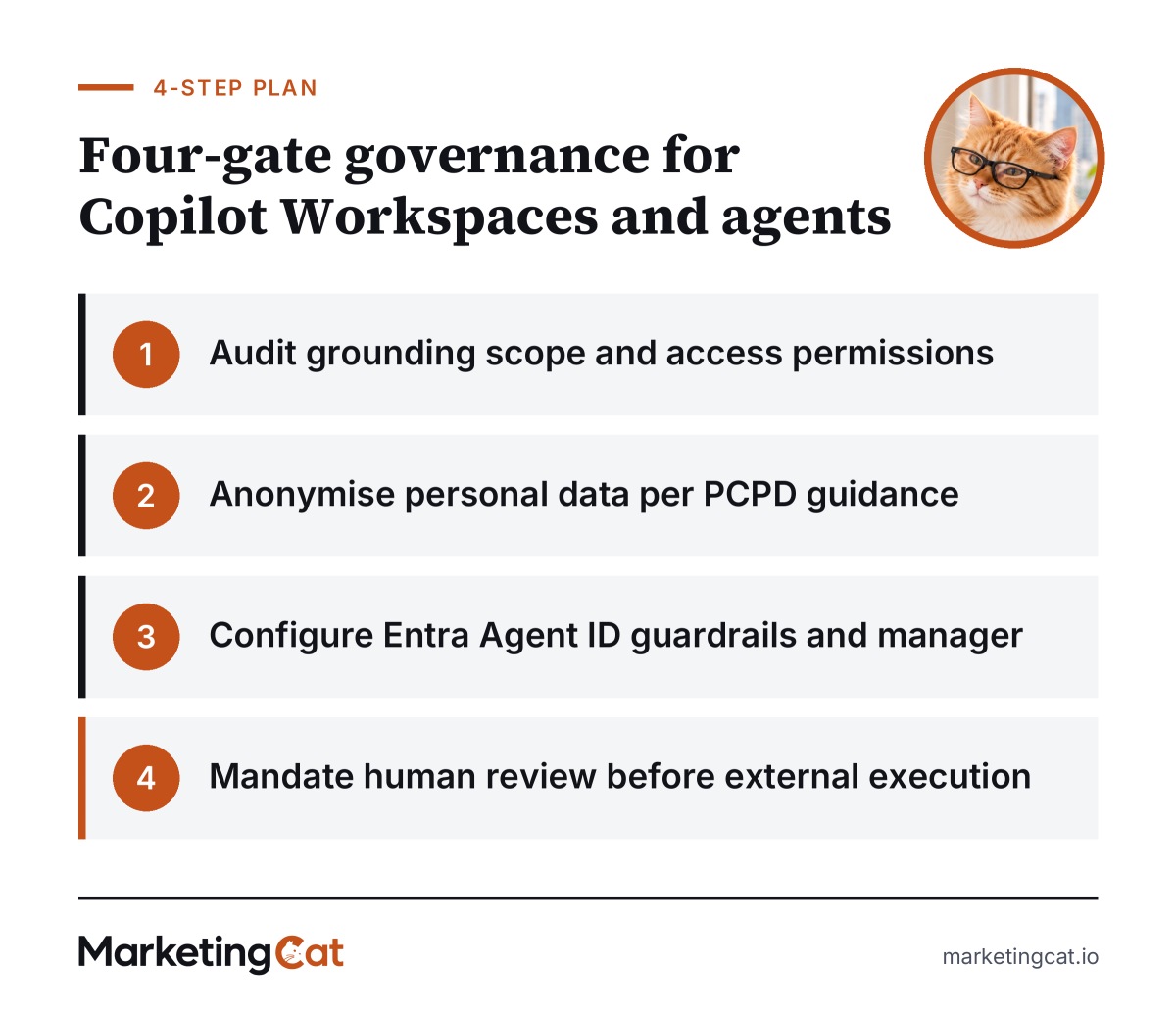
Four-Gate Governance Framework for Copilot Workspaces and Autonomous Agents
- Audit grounding scope and access permissions IT and the marketing operations lead list which SharePoint sites and files a pilot Workspace may use, producing an approved reference list.
- Anonymise personal data per PCPD guidance The data protection officer signs off which client fields are removed or masked before files enter a workspace, producing a written data rule.
- Configure Entra Agent ID guardrails and manager IT scopes each Autopilot’s access and names its manager, so the decision on what it may touch is recorded.
- Mandate human review before external execution The sales or account lead approves any client-facing email or contract change before it goes out, with review kept lighter for internal summaries.
MarketingCat’s template: Agentic Copilot Deployment Readiness Scorecard. Tick each line before a pilot starts.
- Entra Agent ID configured with a designated individual manager and a logged sign-in trail
- Workspace grounding limited to approved files (Microsoft’s cap is 300), with no unmasked personal identifiers
- PCPD employee generative AI checklist signed off by the compliance officer
- Human review checkpoints enforced before external email dispatch or contract edits
- Agent 365 Cost Management (in preview) checked for your tenant, with spending limits and alerts set for usage-billed agent work
- Client contracts checked for ISO or support requirements that Frontier’s preview terms don’t meet
For the wider rollout, our enterprise AI adoption roadmap covers ownership and training.
Workspaces is the lower-risk place to start. It’s covered by existing Copilot and Copilot Chat licences, and it answers only from files you choose. Autopilot is a better fit once your data rules and approval points are set, because it acts on its own and bills by usage. This week, ask IT to check Message center for your tenant’s Workspaces rollout and to confirm whether you’re in Frontier.
Frequently Asked Questions
Does Copilot work in Traditional Chinese?
Yes, for prompts and responses on work or school accounts, according to Microsoft’s supported languages page updated in September 2026. It lists both Traditional and Simplified Chinese. Microsoft also warns that new features may not reach every language at once. For Workspaces audio overviews, input and output are limited to a set of languages that includes Chinese. Test Cantonese-heavy meeting notes and mixed-language client files in your pilot.
What happens to our existing Copilot Notebooks?
They become workspaces automatically, according to Microsoft’s Notebooks-to-Workspaces page. Content stays in place, and existing sharing continues; unshared notebooks remain private. Microsoft says no Notebooks features are being removed and existing links should still open, with redirects where a web address changes. Admins don’t need to take immediate action, but should watch Message center for their tenant’s rollout timing.
Can Autopilot use data from our CRM?
Not confirmed yet. In September 2026, Microsoft announced that Work IQ would bring Dynamics 365 and Power Platform data into Copilot in public preview. The material we reviewed doesn’t say this integration is available to Autopilot specifically. At Ignite on 17 November 2026, Microsoft announced a Dynamics 365 Sales plugin, now generally available, and a Salesforce in Copilot plugin in preview. It didn’t say whether either works with Autopilot, and its material doesn’t cover HubSpot or other CRMs. Ask your CRM vendor and Microsoft whether a connector or plugin exists before planning a pilot around CRM records.
Can staff keep company data out of a Copilot chat?
Yes, with the Work IQ toggle in Copilot Chat, which is on by default. According to Microsoft’s Copilot Chat guide, turning it off means Copilot answers from the web and its training data, not your Microsoft 365 data. The FAQ adds that attached files still count and that personalisation continues. Turning it off doesn’t stop anything staff paste in, so data rules still apply.
How much does Copilot cost in Hong Kong?
Microsoft’s Hong Kong pricing page lists the Microsoft 365 Copilot Business add-on at US$21 per user a month on annual billing, or US$18 in the first year for eligible existing customers who buy by 31 December 2026. Microsoft 365 Copilot is listed at US$30. Cowork and Autopilot are billed by usage on top, at rates Microsoft hasn’t published, so ask Microsoft or your licensing partner for a written quote.